Item media
SafeMode is concealing media marked as NSFW. Use the menu to reveal it.
SafeMode is concealing media marked as NSFW. Use the menu to reveal it.
SafeMode is concealing media marked as NSFW. Use the menu to reveal it.
SafeMode is concealing media marked as NSFW. Use the menu to reveal it.
SafeMode is concealing media marked as NSFW. Use the menu to reveal it.
BTTB 7 · 2024
BTTB 7 Collection 1 Base
Better Body 7, Greater Customizability
- BTTB kind: main
- ER X Variant
- HQ Supported
- Skin Detail
- bttb
- bttb7
Navigate
Edition
View
Download Options



Compatible file types:
- The Sims 4 (.package)
Availability times are shown in Bangkok time (UTC+7).
By continuing to an external provider or downloading, you agree to BANK42n’s Terms of Use.
Details
Key Features:
-
➜ Core Slider | Greater Customizability with new 6 sliders.
-
➜ Deeply integration | Support the latest rig from Wickedwhims (Anal animation support) and less hassle with EA body volume difference when wearing clothes.
BTTB 6 vs BTTB 7 New Updates
BTTB 6 separates every shape and size which makes your Mods folder very heavy and difficult to manage. BTTB 7 has a specially made slider for an erect penis, soft penis, and testicle. This means BTTB 7 will only require 1 file for shape (Versus BTTB 6 that have to multiply shape by size which can be 10x package file in one release).
BTTB 7 also fixes clothing problems when using BTTB 6. You don't have to worry about body volume differences when switching between BTTB body and clothing anymore.
BTTB 7 Core Slider V2 Advance
New easy-to-use 12 Sliders for precise customization Dedicated Body Region for precise BTTB 7 penis adjustment
The BTTB 7 Core Slider V2 Advance is now available to resolve compatibility issues with the BTTB 7. It features a dedicated area for adjustments, allowing for direct control over the penis with an additional 12 sliders.
Highlights
- New easy-to-use 12 Sliders for precise customization
- Dedicated HotSpotAtlas for precise BTTB 7 penis adjustments
- Fine-tuned control as you desire
How to Use Core Slider V2 Advance?
1. Enter Create-A-Sim (CAS) mode
2. Select a male Sim
3. Find BTTB 7 Erect or Soft bottom body part in the Bottom category and uncheck all search filters at the top
4. Adjust the penis as you want
Watch BTTB 7 Core Slider V2 Advance In-game.mp4 to see in action.
Installation
1. Extract .zip file
2. copy and paste the Package file into Mods folder in Documents\Electronic Arts\The Sims 4\Mods\
Note:
-
Remove the old BTTB 7 Core Slider (V1) if exsit.
*Make sure to have WickedWhims installed.
Slider List
Some sliders that adjust the erect penis will also affect a soft penis. Below is a list of sliders and how each one can adjust the erect, soft, or testicle mesh.
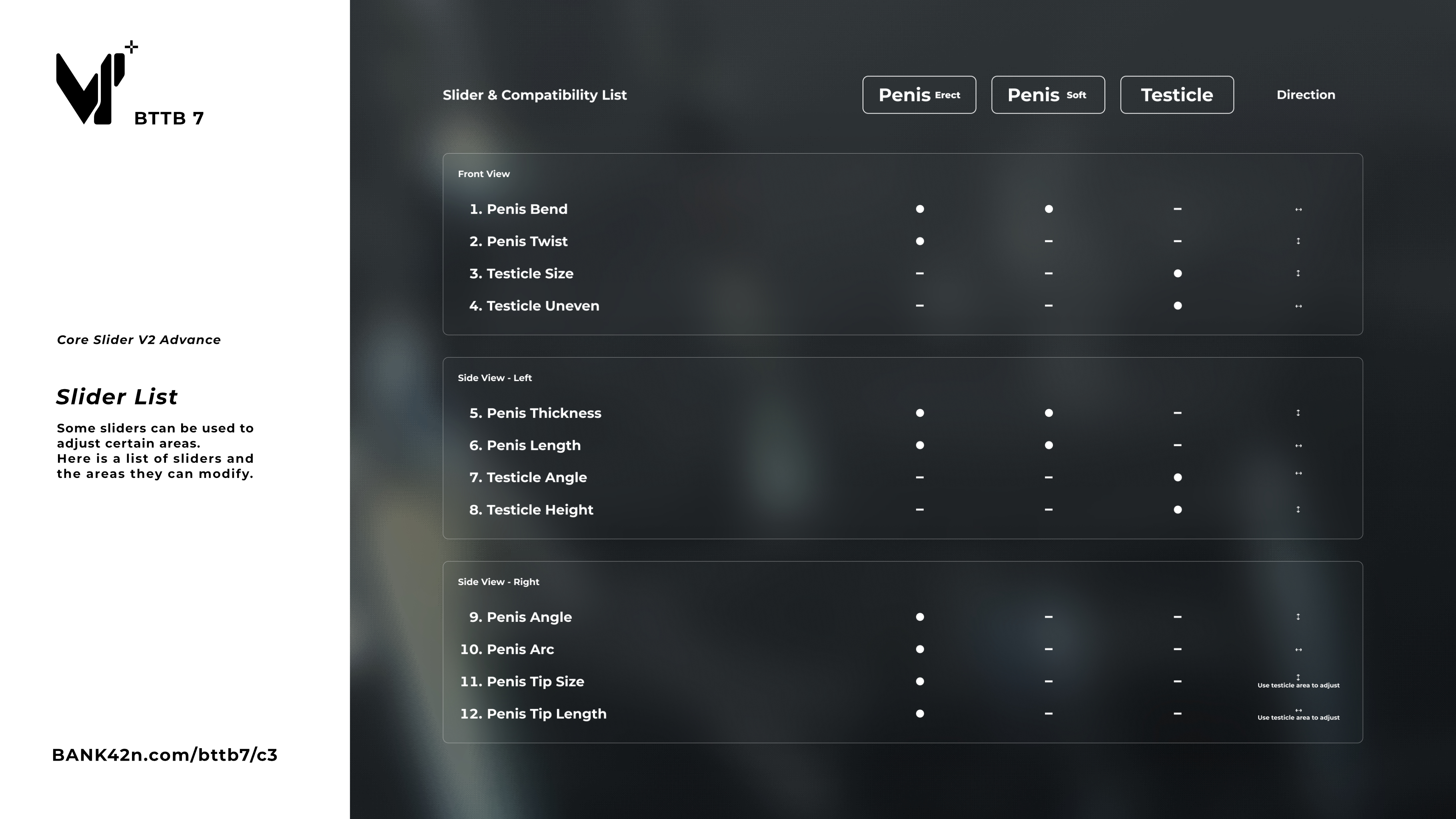
Front View
1. Penis Bend
2. Penis Twist
3. Testicle Size
4. Testicle Uneven
Side View - Left
5. Penis Thickness
6. Penis Length
7. Testicle Angle
8. Testicle Height
Side View - Right
9. Penis Angle
Warning: Excessive adjustments may impact the animation.
10. Penis Arc Warning: Excessive adjustments may impact the animation.
11. Penis Tip Size
12. Penis Tip Length
Legacy Support with BTTB 7 Core Slider V1
If the Core Slider V2 Advance doesn’t work, you can use the Core Slider V1 instead. It’s located in the “Old Core
Slider” folder of the Base File (Collection 1). Just rename the file from .package.disable to .package
Click Here for Instruction
Optional Slider
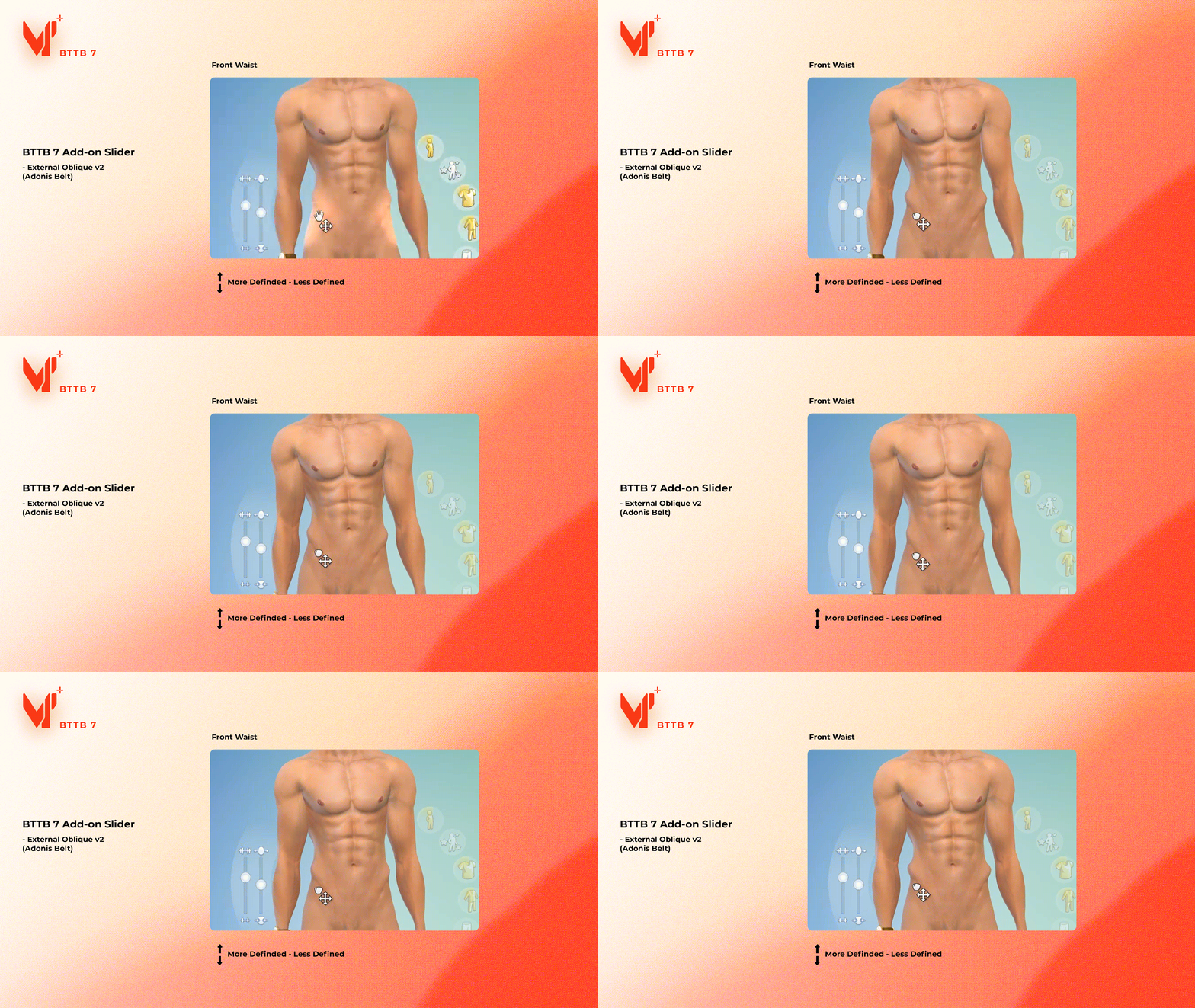
1. External Oblique Slider v2 (Adonis Belt Slider)
External Oblique Slider was first introduced with BTTB 5, if you already have it you don't have to change it unless you want to be able to adjust the External Oblique more defined.
Common Problem:
1. Black Penis
This should only happen when using BTTB 6 with incompatible Alpha Skin. To fix this you will need Color Blend Tool. Download it on BANK42n.com/bttb6/ and scroll down to the bottom.
2. Floating Penis
This will happen if you install BTTB 7 without Wickedwhims because BTTB 7 uses the rig that comes with Wickedwhims, so it's required.
What is Hide in CAS and Show in CAS?
BTTB 7 now comes in Hide In Cas as default, you will not see it in CAS as useless you force show it
Watch the video on how to force the Hide In CAS item to show in CAS.
Update Log:
2025 05 16
-
Fix "BTTB 7 Body Preset Collection 1 No.1 " not showing on some Sims due to an outdated base body morph file.
-
Merge Core Slider V2 Advance to BTTB 7 Base File
2024 09 07
-
Fix the Default Bottom override female genital.
2024 08 29
-
Update Uv_0 for Soft Uncut to make the foreskin look more realistic
-
Update skin overlay to use Native Skin 3 base
-
Add the default bottom part as an option to use as the default body. (Use with caution)
-
Fix No.1 Soft Cut vertex shader bug
2024 06 27
-
Fix No.4 size being bigger than No. 3
-
Improve normal map rendering on the X-axis
-
Improve UV_1
2025 03 06
-
Fix shader issue with use BTTB 7 Bottom Collection 1 No. 1 & No. 2 with BTTB 6 3D Pubic Hair
-
Reorder DisplayIndex to keep BTTB organized in CAS, now BTTB should always found at the very bottom of CAS item list.
2025 07 15
-
Re-import every base mesh in an attempt to fix the disalignment issue between the top and bottom meshes.
2025 07 25
-
Rework the top and bottom body meshes to fix the mesh misalignment issue, including the Default Bottom.
-
Shorten file and folder names to avoid the Windows 11 and Sims 4 path character length limit.
-
Improve finger mesh detail for Top Collection 1 No. 1 and No. 2.
-
Add Top Collection 1 No. 3 Fit Base and New Abs to support the new Native Skin 3.
-
Merge "BTTB 7 Core Slider V2 Advance Penis+Testicles by BANK42n.package" and "BTTB 7 Core Slider V2 Advance Penis+Testicles HotSpotControlAtlas Override by BANK42n.package" into one file to improve organization and potentially fix Core Slider V2 not working for some players.
-
To avoid confusion, removing the previous version of the Base file before installing the latest version is recommended.
2025 07 31
-
Fix some texture maps that do not support HQ mods.
-
Fix Core Slider V2 not working on teens and fairies.
25 08 09
-
Fix Erect does not show up for Fairies in Wickedwhims's Body Selector
-
Rework the mesh's vertex group (Weight Paint) for Fairies, as now some of the rig bones are missing when Fairies' appearance is revealed. (Anus, Butt, and Vagina rigs are missing) This results in soft mesh for fairies no longer supporting Core Slider, at least for now, or until Wickedwhims has any further update on this particular problem.
25 08 12
-
Add a small icon in the CAS thumbnail to indicate which CAS item is for Fairies easily.
Edition Information
- CAS compatibility
- Adult Male
Installation
*Make you have WickedWhims installed
1. Extract .zip file
2. copy and paste the Package file into Mods folder in Documents\Electronic Arts\The Sims 4\Mods\